AI handles the fast replies, so your team can focus on the issues that need a personal touch
Chathot gathers conversations from Facebook, Instagram, Zalo, TikTok, Email, Website chat and more into a single inbox. The AI replies on its own when nobody is on duty, routes work automatically, and a companion assistant helps agents while they type.
For teams that already have an account. Contact your administrator if you don't have one yet.
Connects to: Facebook Messenger, Instagram, Zalo OA, TikTok, Email, Website chat, Telegram, LINE, WhatsApp, Slack, Threads and more.
+…
AI is liveAI is writing a reply
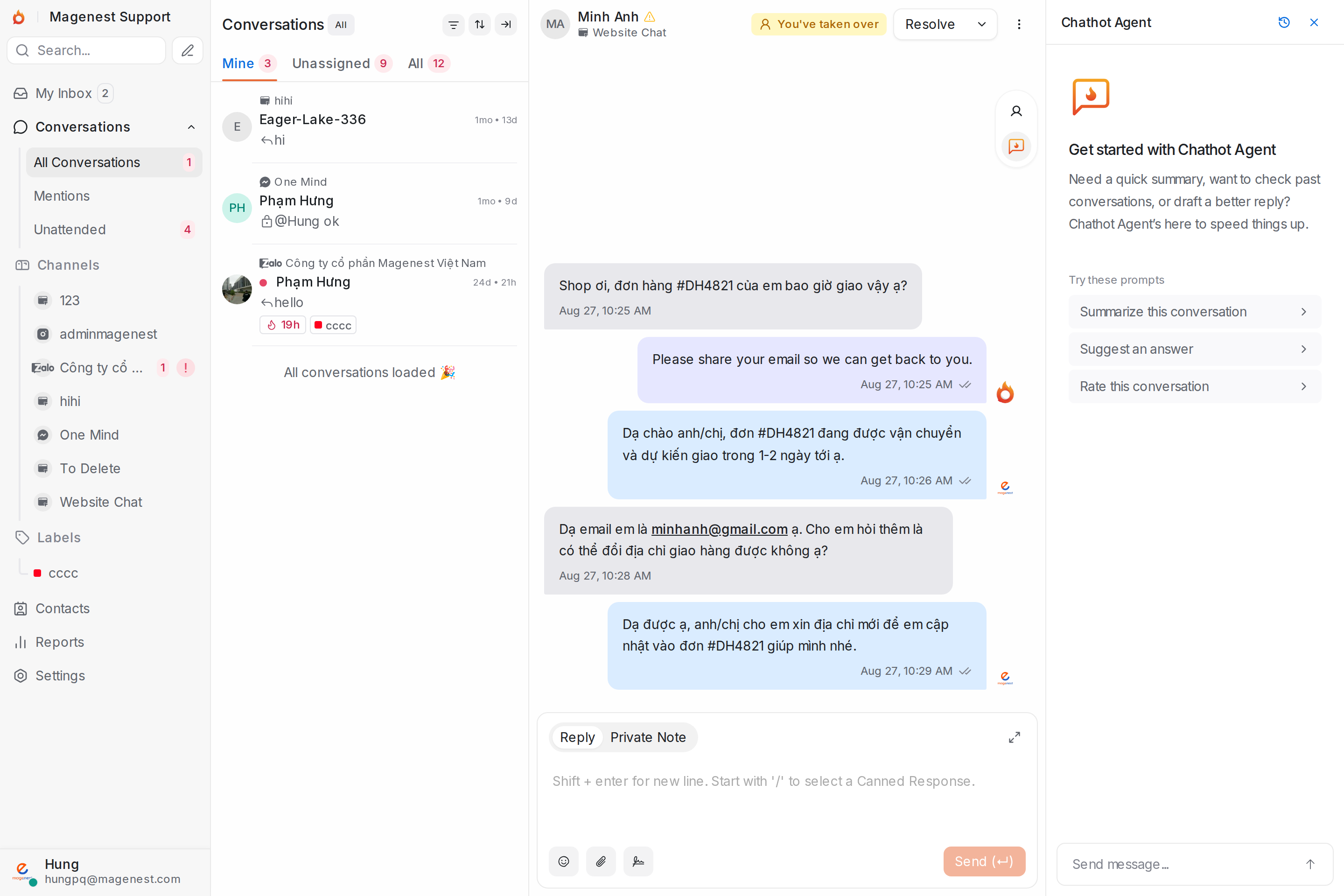
A unified three-column inbox: conversations, the thread, and the Chathot Agent assistant suggesting replies right beside it
Customers and partners
AI that answers customers, routes work and coaches your agents
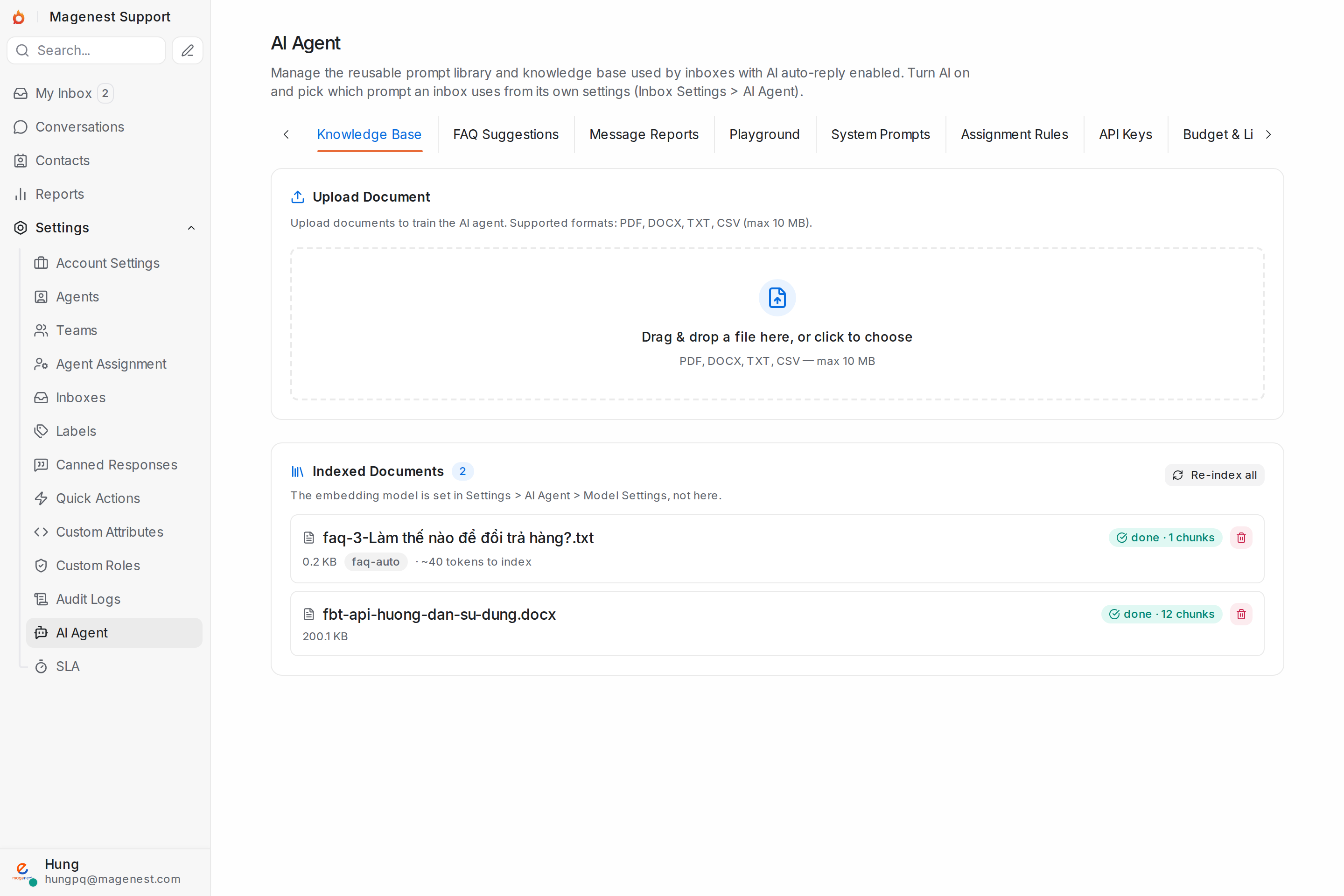
Configured in one place: the AI Agent hub under Settings.
Automatic customer replies
Grounded in your internal Knowledge Base (RAG) and answering in the customer's own language. When it lacks grounds, the customer asks for a person or keeps repeating themselves, it hands over; when a conversation goes quiet the AI judges whether it is really finished before closing it.
Chathot Agent for your team
Summarizes conversations, suggests replies and looks up contacts and past conversations while the agent types. For actions like adding a note, labelling, changing priority or resolving, it only proposes and waits for the agent to confirm.
Self-learning FAQ
Collects the questions customers keep asking into suggested new articles; an administrator only has to approve them before they join the Knowledge Base.
Playground: test before going live
Check how your prompt and Knowledge Base answer before real customers meet the AI.
Smart routing
Spots sensitive topics by keyword or AI and sends them to the right team, assigning only to people who are on shift and not overloaded, and knows when to stay quiet and hand over to a person.
Budget & multiple API keys
Set a monthly budget, email administrators before you exceed it, and rotate across several API keys so nothing stops when one is rate-limited.
The AI Agent hub manages the Knowledge Base, self-learning FAQ, Playground, routing rules and budget in one place
Tools for everyday work
Unified inbox
Three columns: conversation list, the thread, and customer details. Filter by status, channel, label, team or assignee, updated in real time.
Automatic assignment
Round robin or Balanced distribution per inbox, plus rules by keyword or AI topic to route straight to the right team.
SLA & overdue alerts
Set thresholds for first response, next response and resolution time, optionally counting business hours only. A countdown sits at the top of the conversation and, when overdue, alerts the assignee and the managers you choose.
Canned replies & quick actions
Type "/" to insert a canned reply. Quick actions bundle several steps (label, assign, resolve...) into one click, applied to many conversations at once.
Reports & analytics
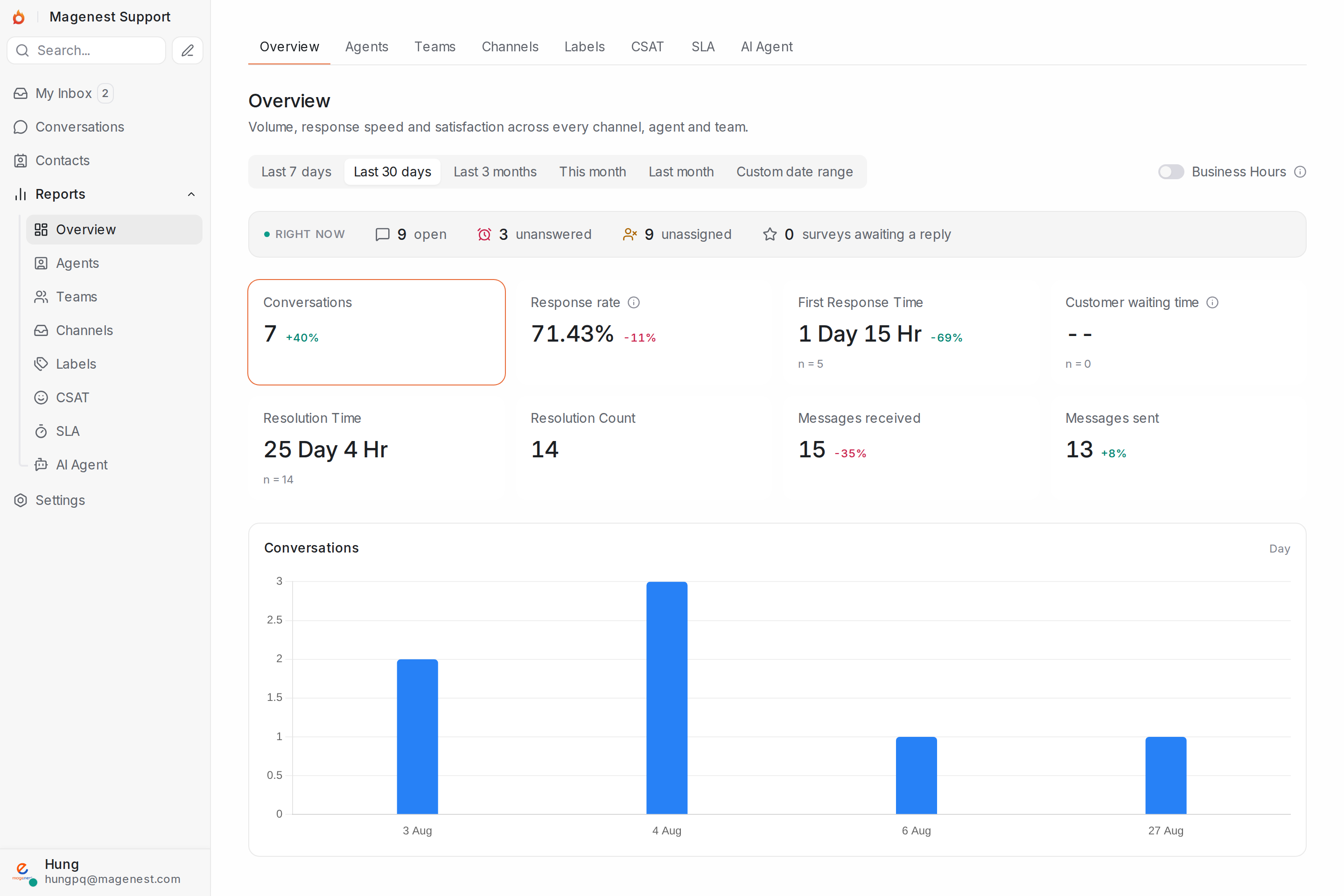
Seven tabs: Overview, Agents, Teams, Channels, Labels, CSAT and SLA, with date-range filters and an option to count business hours only.
Role-based permissions
Custom roles grant agents extra permissions, with a system-wide activity log, two-factor authentication and a page to review and revoke each login session.
Auto-translate
Customer messages are translated into the agent's language and replies are translated back, including greetings, out-of-hours notices and surveys. The original is always one click away.
Shifts & workload limits
Define shifts with their own time zone. Conversations are only assigned to people who are on shift and under the maximum number of open conversations; the rest wait their turn.
Notifications that find you
In-app bell, browser push and email, each switchable per event type. No duplicates when the agent already has the app open.
Performance overview: response rate, handling time and a conversation chart over time
Reports by agent, team, channel and label
Response rate, first response time, reply time and resolution time, calculated for each period.
Break results down by Agent, Team, Channel and Label to see where work is piling up.
Counting business hours only is optional; turn it on when you need to compare against your SLA commitments.
AI replies don't count as a response, so the numbers reflect the real effort of your people.
Channels you can connect
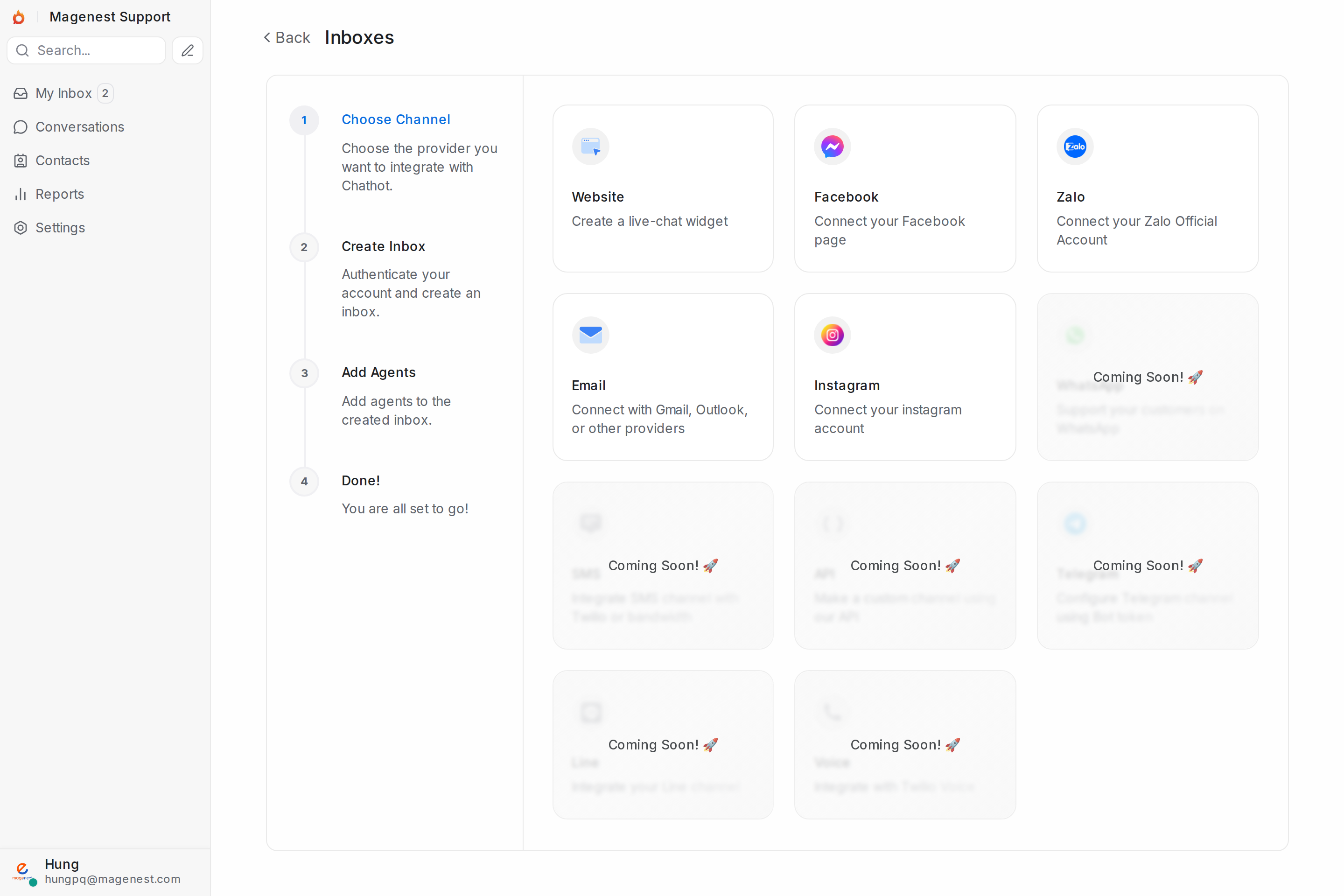
Connect the channels you already use and keep a familiar experience for your customers, with the AI working right on each channel.
Add a new inbox in a few steps: choose a channel, sign in to the account, add agents
Facebook Messenger
Reply to Page comments and messages right in the shared inbox, with automatic AI replies when enabled.
Instagram
Instagram direct messages, with the same workflow and the same AI assistant as every other channel.
Zalo OA
Connect a Zalo Official Account, ideal for customers in Vietnam.
TikTok
Receive and reply to messages from TikTok Business Messaging.
TikTok Shop
Chat with buyers per order right in the shared inbox.
Email
A dedicated email inbox that automatically threads conversations, with CC/BCC and email forwarding.
Live Chat / Website
A chat widget embedded on your website, with AI answering 24/7, even outside business hours.
Telegram
Connect a Telegram bot with its token to receive and reply to customers' private messages.
LINE
Connect a LINE Official Account and reply from the same inbox as your other channels.
Lazada
Connect a Lazada shop to answer buyers' messages right in the shared inbox.
Shopee
Connect Shopee Seller Chat to answer buyers' messages right in the shared inbox.
WhatsApp
Support customers over the WhatsApp Cloud API; after 24 hours you can still reach out with a Meta-approved message template.
Slack
Connect a Slack workspace: receive direct messages and channel messages, and reply from the shared inbox, attachments included.
Threads
Answer replies and mentions on your Threads posts. Each comment thread is its own conversation, with avatars and tagging of whoever you're answering.
Google Business
Reply to reviews on your Google Business Profile, alongside your other conversations.
Coming soon
SMS and a few more platforms will be added over time.
Permissions and audit trail
Role-based permissions
Only the right people see the right data and conversations.
Activity log
Every important change is recorded, searchable and filterable by who made it.
2FA & session management
Two-factor authentication, enforceable for the whole account; see and revoke signed-in devices.
Encryption of sensitive data
API keys and connection credentials are stored encrypted.
Does your team already have an account?
Sign in to pick up your conversations where you left off.